


The Critical Virus Alert has emerged as a significant cybersecurity concern for Google Chrome users. This article delves into a detailed exploration of this threat and its implications.
Understanding the Critical Virus Alert in Google Chrome scam
At its essence, the Critical Virus Alert is a deceptive program. Although it presents itself as a legitimate virus alert, it is actually a browser hijacker. Its main method of operation involves introducing unsolicited changes to browsers. These alterations appear as a surge of pop-ups, banners, and numerous online advertisements, disrupting the user’s browsing experience.
Malware, such as the Critical Virus Alert in Google Chrome, is primarily driven by the motive of revenue generation. They accomplish this through various compensation models. In the Pay Per Click model, every interaction a user has with an advertisement, whether it’s a click or a tap, results in a minor monetary benefit for the hijacker. Conversely, the Pay Per View model accrues revenue based on the count of users redirected to a specific site by the hijacker. The greater the number of redirections, the more substantial the profit.
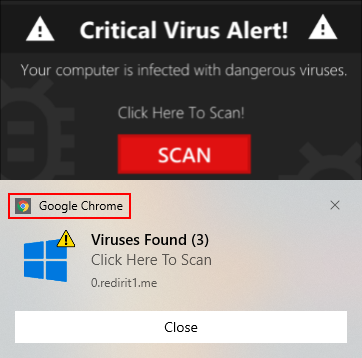
To amplify the effectiveness of their advertising strategies, these applications implement changes to the user’s browser. For example, the hijacker might impose a new search engine that biases search results, favoring websites and pages that the hijacker seeks to endorse. Moreover, the default homepage could be substituted with one that promotes a particular site, ensuring the user lands on this page every time they initiate their browser.
The latent threats of the Critical Virus Alert in Google Chrome are more sinister than its apparent nuisances. The security hazards linked with such hijackers encompass the risk of malware exposure. Advertisements displayed might contain malicious code, leading to malware infiltrations, including perilous threats like ransomware and Trojans. Another hazard is the threat to data security. Engaging with these ads or the websites they direct to might culminate in unauthorized data retrieval, potentially resulting in breaches of confidential and sensitive data. Additionally, some ads could be crafted to exploit system vulnerabilities, setting the stage for additional infections or system breaches.
Specific symptoms can serve as warning indicators if your browser becomes a victim of the Critical Virus Alert in Google Chrome hijacker. An evident surge in pop-up ads, banners, and other advertisement forms is a primary sign. The browser may also involuntarily redirect to unexpected pages or websites. Alterations to the default search engines, homepages, or other browser configurations that weren’t initiated by the user can also suggest a compromise. Furthermore, the browser may exhibit reduced performance, become unresponsive, or experience frequent crashes.
Remedial measures against Critical Virus Alert in Google Chrome
If you suspect that your browser has been compromised by Critical Virus Alert follow these steps:
1. Immediate isolation
Disconnect the affected device from the internet. This can prevent the hijacker from transmitting data or downloading additional payloads.
2. System scan
Use a trusted antivirus program to scan your system thoroughly. Ensure any threats detected are quarantined or removed.
Download Critical Virus Alert scanner and remover
3. Browser reset
- Open Google Chrome, click the Customize and control Google Chrome (⁝) symbol in the upper right, and choose Settings

- Click Reset settings

- The browser will display an extra dialog so that you can familiarize yourself with the logic of the cleanup before proceeding. Go ahead and click the Reset settings button as illustrated below

- Restart Google Chrome
Conclusion
The Critical Virus Alert in Google Chrome underscores the evolving challenges in the digital landscape. While it might not be a genuine virus, its potential to introduce users to a myriad of online hazards is significant. Staying informed, adopting proactive protective measures, and being vigilant can ensure a safer browsing experience in this dynamic digital age.