


The SecurityAgent on Mac plays a pivotal role in managing authentication and security-related functions. Despite its importance, users may encounter a range of issues with SecurityAgent, from high CPU usage to the perplexing “Unapproved caller” error. This guide delves into these problems, exploring their potential causes and offering effective solutions.
The high CPU usage problem with SecurityAgent
Typically, SecurityAgent functions seamlessly in the background, managing security prompts and user authentication. However, there are instances where it begins to consume an excessive amount of CPU resources. Such abnormal behavior can cause system slowdowns, unresponsiveness, and in extreme cases, prevent users from logging in or performing basic functions.
Possible causes of high CPU usage by SecurityAgent:
- Software glitches or conflicts: High CPU usage may stem from conflicts or glitches within macOS, often due to incompatible applications, corrupted system files, or failed updates.
- Keychain access issues: Being closely tied to keychain access, any discrepancies or corruptions in the user’s keychain can lead SecurityAgent to use more resources than usual.
- Excessive authentication requests: Continuous or excessive authentication requests, possibly from certain applications or system components, can also cause high CPU usage.
Suggested solutions:
- Boot in Safe Mode: Booting your Mac in safe mode can be instrumental in diagnosing the issue. This mode restricts the Mac to essential operations and can pinpoint if third-party applications or extensions are the culprits. It also clears certain caches, potentially resolving the problem.
- Keychain management: Addressing keychain issues, such as resetting it or fixing permissions, can often mitigate high CPU usage caused by SecurityAgent.
- Update macOS and Apps: Keeping macOS and all applications updated can help resolve any conflicts or bugs that might be contributing to the issue.
- Monitor and manage processes: Advanced users, particularly in server environments, might consider monitoring the CPU load for SecurityAgent and its instances. Scripts or system tools can be used for this purpose. If high CPU usage is detected, a careful restart of the process may be necessary.
Understanding the “Unapproved caller” SecurityAgent Mac error
The “Unapproved caller” error typically appears as a persistent pop-up requesting the keychain password. Despite multiple password entries, the pop-up often reappears, failing to resolve the issue. In severe cases, this error can escalate to more critical problems, such as preventing the Mac from rebooting or shutting down, and in extreme scenarios, leading to a completely black screen with only a cursor visible.
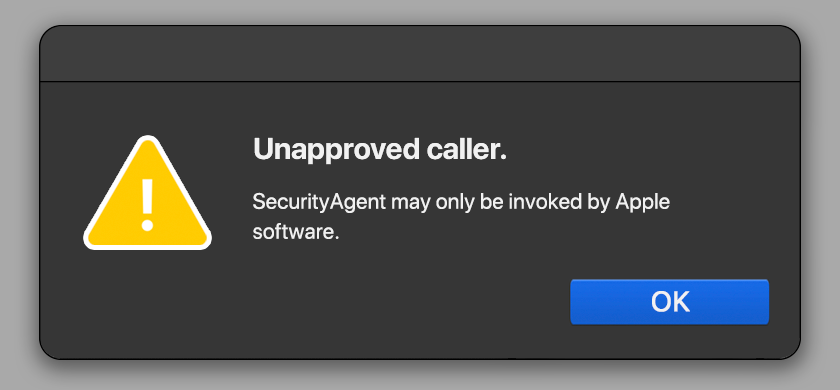
Potential causes of the error:
- Keychain access issues: This error may be linked to issues within the user’s keychain, such as corruption or a mismatch between the keychain and user account passwords.
- Operating system glitches: Sometimes, underlying issues with macOS, possibly due to software corruption or failed updates, can trigger this error.
- Certificate issues: For some users, resolving corrupt certificates in the keychain has fixed the issue, indicating a connection to security and authentication problems.
Recommended solutions:
- Safe Mode: Booting the Mac in safe mode is often suggested to isolate and identify the issue. However, some users have reported difficulties in successfully booting into safe mode, suggesting a more complex problem.
- Testing in another user account: If the issue persists in safe mode, testing in a different user account can help determine if the problem is account-specific or system-wide.
- Resetting NVRAM and PRAM: Resetting these small memory spaces used by macOS for storing certain settings can sometimes resolve startup and hardware configuration issues.
- Reinstalling macOS: For issues affecting multiple user accounts, reinstalling macOS can provide a fresh operating system, potentially resolving the underlying software issues.
In complex scenarios, particularly those involving server environments, seeking professional assistance or consulting with Apple support is highly recommended, especially when standard troubleshooting methods are ineffective.
Final thoughts
SecurityAgent issues on Mac, including the “Unapproved caller” error and high CPU usage, can arise from various causes, such as keychain problems, software glitches, excessive authentication requests, and system-level errors. The solutions are diverse, encompassing keychain management, system reinstallation, booting in safe mode, and process monitoring. Each situation may require a customized approach, and users are advised to back up their data and proceed with caution when making system-level changes. For more complex problems, especially in server contexts, consulting IT professionals or Apple support is crucial.
In summary, while SecurityAgent issues can be challenging, understanding their nature and potential solutions can help users effectively address them. It’s essential to approach these problems methodically, ensuring data backup and system stability, especially when making significant changes or in server environments.